Garden store
src/state/garden.jsSignals store plot assignments, watering journal, filter and persistence status.
Lifestyle starter
A garden journal for tracking plants, observations and seasonal care.
Dated manual watering updates reminders, undated legacy records stay honest, plot assignment displays correctly and observations have history. Botanical silhouettes and responsive code guides are verified.
This tracks the recorded release phase. The checks below include later findings and ongoing refinements.
The following describes the intended reference. Features are not a verification claim; recorded check results below define what has actually been tested.
Client-rendered application served from explicit static route entries; browser-local state, not a shared server database.
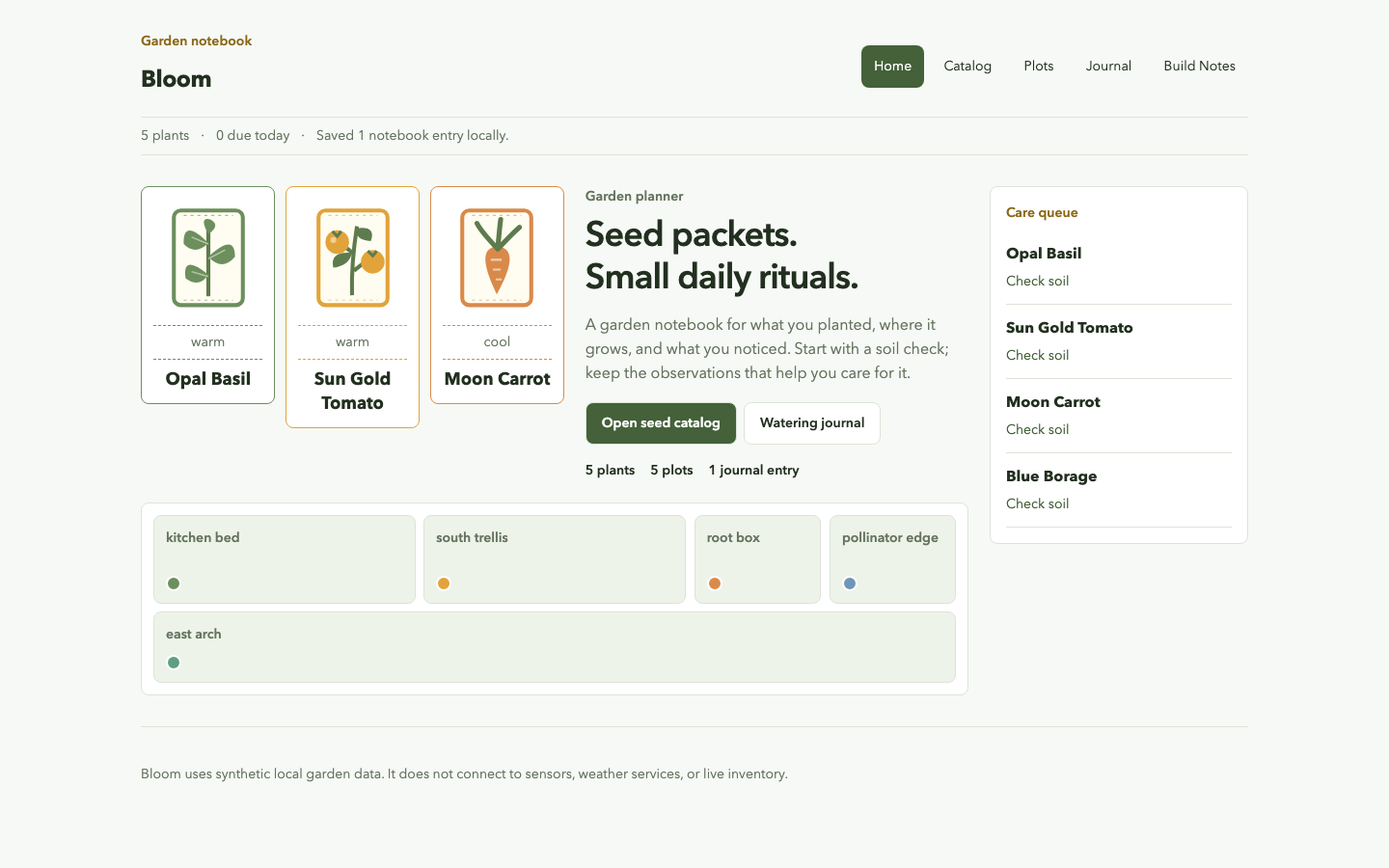
Bloom is a gardening planner starter with plant catalog routes, plot assignments, watering journal state and derived care queues.
Garden store
src/state/garden.jsSignals store plot assignments, watering journal, filter and persistence status.
Routes
src/routes.jsThe app includes catalog, plant detail, plots, journal, build and fallback routes.
Build page
src/pages/Build.jsxThe in-app guide explains local state, aliases and browser-only durability.
Dated care and legacy migration
src/utils/care.jsPure explicit-clock care math ignores invalid/future watering and observations; legacy notes keep unknown dates as null.
Responsive application stylesheet
src/styles.cssContent-fit plant panels and local typography preserve dated watering and assignment state.
src/state/garden.js
The function rebuilds known plot buckets and removes the selected plant from every previous bed before adding it to the target.
export function assignPlant(plot, slug) {src/state/garden.js
The queue reacts to both the season filter and journal entries without becoming a separate mutable list.
export const careQueue = computed(() => filteredPlants()
  .map((plant) => ({
    ...plant,
    ...careForPlant(plant, wateringJournal(), new Date(clock())),
  }))
.sort((a, b) => ({ overdue: 0, today: 1, check: 2, soon: 3, rest: 4 }[a.urgency] - { overdue: 0, today: 1, check: 2, soon: 3, rest: 4 }[b.urgency])));src/utils/care.js
No valid dated watering means Check soil, not a fabricated overdue date. Observations remain notes, not watering events.
const nextCare = midnight(latest.observedAt);
nextCare.setDate(nextCare.getDate() + plant.waterEvery);src/styles.css
Content-fit plant panels and local typography preserve dated watering and assignment state.
.seed-packets {
  grid-area: packets;
  display: grid;
  grid-template-columns: repeat(3, minmax(0, 1fr));
  gap: .65rem;
  align-items: start;
}Actual desktop and mobile screenshots were reviewed after domain-specific layout refinements. Final review cleared the presentation; functional hosting checks remain separate.
Source, README and BUILD guide are published. The Vura deployment is ready; HTTPS home, build guide and genuine unknown404 were checked. Local clean-install and browser workflows are distinct from this hosted route proof.
GitHub CI passed at the recorded source commit: clean install, tests, production build and the configured Chromium browser or smoke workflows. Public README and BUILD files exactly match this checkout.
Fresh HTTPS checks returned200 for home and the in-app build guide, and404 for an unknown path. Source comparison confirms only README or CI configuration changed; the hosted application artifact is unchanged.
Fresh desktop, mobile and product-detail screenshots are captured. Claude Opus5.5 at medium effort is reviewing the rendered evidence and source; this is not a passed design verdict or a new release.
Independent code/spec review cleared the accepted changes; this recorded source workflow passed, the production build completed and the existing Vura project reports ready production. Live screenshots and native workflow evidence are captured separately.
Source 57cd10e9e295b9dda7b84217678d370ccf1e9960 is published and its workflow passed. The existing Vura project reports ready production at the recorded deployment. Fresh desktop/mobile/detail screenshots and native workflow proof confirm the accepted refinements; local and hosted checks remain separate evidence.
Repairing dated watering urgency and plot assignment display, and adding observations and botanical detail. Implementation and fresh release verification are pending; this is not a new deployment claim.
Production builds, app regressions and desktop/mobile workflows pass. Independent reviewers cleared the frozen source after async ownership, stale views, storage recovery and guide-width repairs. Current demo/source links still identify the previous verified deployment.
Reviewed source merged after configured CI passed, then built and deployed through the public CLI. Fresh released desktop/mobile captures, actual assets and critical workflows passed; deployment and source identifiers match this record.
Ready production deployment and live response identifiers match the published source checkpoint. Fresh home, product and build routes returned 200 at 1440 by 900 and 390 by 844, with six actual viewport captures, 16px body text, no horizontal page overflow or runtime error overlay. Mobile primary navigation responds and keyboard focus is recorded.
· Live on Vura
Published shared typography and responsive control refinements are tied to the exact live deployment and source revision. Actual released captures replace the previous gallery preview; existing product behavior and source-grounded lessons are retained.
· Live on Vura
Dated manual watering updates reminders, undated legacy records stay honest, plot assignment displays correctly and observations have history. Botanical silhouettes and responsive code guides are verified.
· Live on Vura
Unique product identities and deeper workflows are implemented and independently reviewed. Existing releases remain accessible while new source is published and fresh deployments are exercised.
· Live on Vura
Repairing dated watering urgency and plot assignment display, and adding observations and botanical detail. The current source and deployment links still identify the previous verified release.
· Live on Vura
The garden uses packet illustrations, meaningful bed shapes/plant dots and an aligned care queue. Plot assignments and plant routes passed live checks.
· Live on Vura
The garden uses packet illustrations, meaningful bed shapes/plant dots and an aligned care queue. Plot assignments and plant routes passed live checks.
· Live on Vura
The existing public app remains available while a new design review examines hierarchy, typography, navigation and workflow clarity. Actual findings and before/after repairs will be recorded as they are verified.
· Live on Vura
Public source, green CI and the live app were checked together after the clean-machine documentation pass. Lessons and limitations now reflect the implemented code rather than pending pre-release work.
· Live on Vura
The public source and build reference match the released learning journal, and the source workflow is green. The demo remains live at the same verified deployment; documentation-only refinements did not change application code.
· Live on Vura
The README now installs the locked Chromium engine after npm ci and explains the Linux system-library prerequisite. The hosted application is unchanged; code examples, repair notes and boundaries remain source-backed.
· Live on Vura
The reviewed implementation is available from its independent repository and real hosted URL. Detailed code examples and actual repair notes are linked below.
· In review
The local implementation is complete and revised visual evidence has passed review. Source and demo links will appear only after publication and hosted verification.
· Building
The standalone project files exist and the product build is active. No local verification or live release is claimed yet.
· Planned
This is a planned starter, not a working release. Implementation, tests, public source and deployment evidence will be added as they are completed.
No release blockers are recorded for this snapshot.
Read the public README and BUILD.md, reproduce the recorded checks and inspect the source before adapting the starter. A live demo, where available, provides separate deployed evidence.